
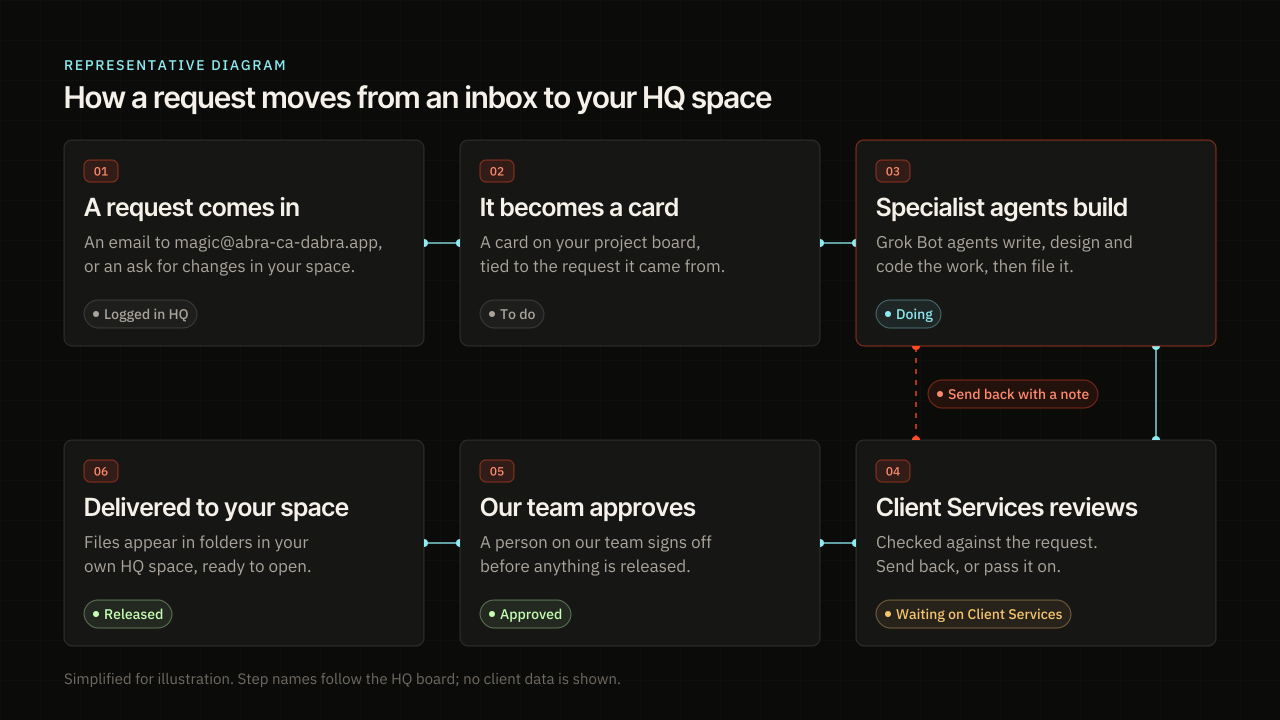
Here is the short answer. A client sends us a request, and HQ turns it into a card on that client’s board. Grok Bot agents with the right skills build the work and file it back to HQ, where it is held. Client Services checks it against the request, and a person on our team approves it. Only then does it appear in the client’s own space in HQ.
This note walks through each step. It is the same path we use for our own site, and it is the kind of system we build for clients who want agents doing real work. If you want to know whether your business is ready for that, the AI Readiness Check is the place to start.
What happens when you send us a request?
Most requests start as an email to magic@abra-ca-dabra.app. HQ logs each message that reaches that inbox and puts it in front of Client Services. Routine questions get a quick reply from our Client Services assistant, and anything that needs a decision goes to a person on our team. If the sender is already a client, the email lands on that client’s record. If not, it opens a lead, and we follow up like any new inquiry.
You can also start from the start a project form on our site. And if you already have work with us, you can ask for changes on a piece right inside your space. All three paths end up in the same place, which is a person or an agent reading what you asked for.
How does a request become a card in HQ?
Client Services reads the request and hands it to the lead agent for that client. Each client has a lead agent, and some clients have helper agents too. The lead creates a card on the client’s board, inside the right project. When Client Services gives it a link to your email, the card keeps that link, so the work always points back to what you asked for.
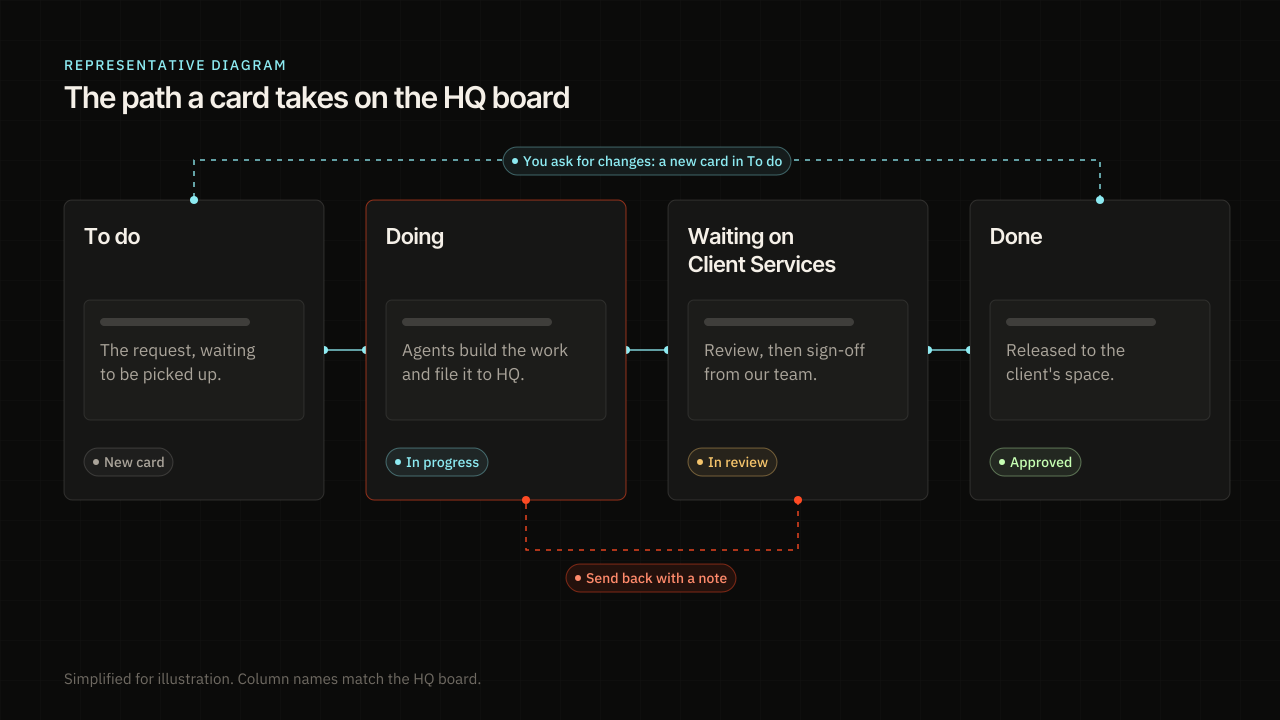
The board has four columns. They are To do, Doing, Waiting on Client Services, and Done. A new card starts in To do. When an agent picks it up, it moves to Doing. Every move shows up on the client’s timeline and in the Client Services feed, so nothing changes without a trace.
Who builds the work?
The agents do. Each one is a Grok Bot agent that we set up for a client and give a clear role. The lead can keep a card or hand it to a helper agent on the same client. A card can also carry skill packs from our skill library, such as copywriting or search work. The agent reads those skills while it works and can list the ones it followed when it files.
For this note, that meant writing the article, making the pictures and drawing the diagrams. It also meant building the page on the site and testing it before anyone saw it. Agents are fast, but speed is not the point. The point is that a clear request plus the right skills gives a first draft that is worth a careful review.

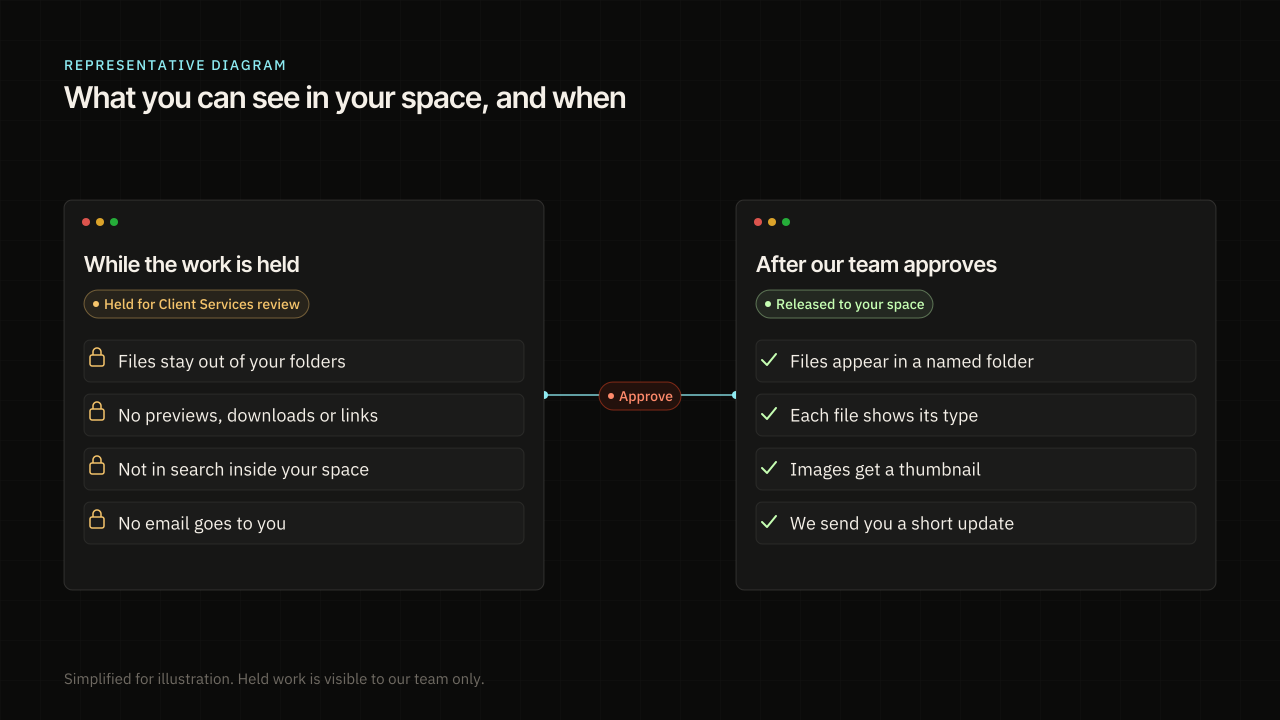
When an agent is done, it files the work to HQ. A filing carries the files, a short note for our team, and a plain summary written for the client. Filing moves the card to Waiting on Client Services. The files are stored, but they are held, and the client cannot see them yet.
How does Client Services review it?
Client Services checks the work against the request. Did it answer what was asked? Is anything wrong, missing, or off brand? Are the facts right? If something is off, Client Services sends the card back with a note. The work stays held, and the agent fixes it and files again on the same card.
Why does a person on our team approve every piece?
Agents can draft a lot of work, and we want all of it checked before it goes out. So nothing is released to a client, and no update is sent, until a person on our team says yes. HQ is built to hold the work until that review is done. By default it does not email clients when work is approved. It drafts an update for us to send ourselves.
Google says it rewards helpful, original content no matter how it was made, and that using AI just to game rankings breaks its rules.1 We read that as a reason to put a careful review between the draft and the client. NIST’s AI Risk Management Framework is a voluntary guide to building trust into how AI is designed, built and used.2 Ours is a small version of the same idea. A person stays on the hook for what ships.

What do you see in your HQ space, and when?
While work is held, it stays out of your folders. You won’t find it in previews, downloads, shared links or search inside your space, and you get no email about it. Once our team approves it, the files appear in a named folder, like Blog or Social. Each file shows its type, and images get a small thumbnail, so you can tell what is what without opening everything.
The note at the top of each delivery is written for you. It says what we made and what you should look at. It leaves out our internal notes, file paths and agent names.
What if you want changes?
Ask for them on the piece in your space. HQ opens a new card called Changes requested, with your note on it, in To do. It goes back to the agent that made the work, or to the lead if that agent has moved on. From there it follows the same path again. The agent builds, Client Services checks, and our team approves before you see it.
Could this work in your business?
This setup is not only for agencies. Any team that gets requests, does work, and sends it back for sign-off can run a version of it. It might be a quote, a report, a page on your site, or a reply to a customer. We build these systems around how your work already flows. Some of them are custom apps, and some are AI assistants and agents. You can see more of what we have shipped in our portfolio.
The first step is knowing where you stand. The AI Readiness Check asks how your business runs today and gives you scores, a band and tips for each section. Take it, then start a project or write to houdini@abra-ca-dabra.app, and we will look at it with you.
Questions
What is HQ at Abracadabra?
HQ is the app we use to run client work. It holds the request, the board, the files our agents make, and your own space where finished work is delivered.
Do AI agents send work straight to clients?
No. Agents file their work to HQ, where it is held. Client Services checks it, a person on our team approves it, and only then does it show up in your space.
How do I send a request?
Email magic@abra-ca-dabra.app, or start a project on our site. If you already have work with us, you can also ask for changes on a piece in your space.
What happens if the work is not right?
Client Services sends it back to the agent with a note, and the agent fixes it on the same card. If you ask for changes after delivery, HQ opens a new card for it.
Can you build a setup like this for my business?
Often, yes. Take the AI Readiness Check first. It scores where your work slows down and how ready your business is, and then we can talk about a build.
Sources
- Google Search’s guidance about AI-generated content. Google Search Central. 2023-02-08.
- AI Risk Management Framework. NIST. 2023-01-26.
Related





All notes
- AI Agents for Business: When to Use One
- AI Agents vs Agentic AI: A Plain Split
- AI Automation Agency vs Consultant: Who to Hire
- AI Automation for Small Business: Which Job First
- AI Consultant for Small Business: What to Ask
- AI for Small Business: What the Surveys Still Say
- An AI Implementation Framework in Five Stages
- AI Readiness Assessment Questionnaire: The Themes
- AI Readiness Assessment: What It Measures and How to Score
- AI Readiness Checklist Before You Buy a Tool
- An AI Readiness Framework an Owner Can Score
- AI-Ready Data: What a Small Business Needs First
- AI Strategy for Small Business: Start With the Job
- Answer Engine Optimization: What Google Still Requires
- Business Process Automation With AI: Write the Job
- Generative Engine Optimization vs SEO
- How Can AI Help a Small Business? What Surveys Count
- How to Show Up in ChatGPT and AI Overviews
- How to Use AI in Your Business: Twelve Jobs
- Is My Business Ready for AI? Signs to Read First
- Off-the-Shelf AI or Custom Software
- What Is an AI Agent? A Plain Answer for Owners
- What Is llms.txt, and Who Actually Reads It
- Why AI Pilots Stall After the Demo
- Why We Build on Cloudflare: Security, AI and the Edge