
Here is the short answer. For most business work, an AI workflow beats an AI agent, because a fixed path does the same thing every time and an agent does not. A workflow is a set of steps you write down in code, and the AI does one job inside a step. An agent is an AI that picks its own next step as it goes. We use agents every day, but we put them inside a workflow, and we never let one hold the whole job.
- Cited in this note
- 50%
This note compares the two on the points an owner cares about. Then it shows how we run our own work this way, with real steps from our setup. If you want to know where your business stands first, the Readiness Check takes five to seven minutes.
We compared the two on five points:
- Same result each time: does the same input take the same path on every run?
- Cost you can plan: can you say ahead of time how many steps a job will take?
- Easy to fix: when something breaks, can you see the step that broke?
- Open jobs: can it handle a job where nobody knows the steps yet?
- Safe to leave alone: what happens when nobody is watching it?
| Point | AI workflow | AI agent |
|---|---|---|
| Who picks the next step | The code you wrote | The model, as it goes |
| Same result each time | Yes, the path is fixed | No, it can take a new path on each run |
| Cost you can plan | Yes, the steps are known | Harder, it may loop or take extra turns |
| Easy to fix | You can see the step that failed | You read back through its choices |
| Open jobs | Weak, the steps must be known | Strong, this is what it is for |
| Best for | Repeat jobs with clear rules | Research, first drafts, code changes |
What is the difference between an AI workflow and an AI agent?
A workflow follows a path you wrote, and an agent writes its own path as it works. Anthropic, the company behind Claude, draws the line the same way. It says workflows run models and tools “through predefined code paths,” while agents “dynamically direct their own processes and tool usage.”1
In a workflow, the AI is a worker on one step. It might read an email and sort it, or write a first draft of a reply. The code decides what came before that step and what comes after it. In an agent, the AI is the boss of the steps. It looks at what it just found, picks a tool, and keeps going until it thinks the job is done.
Both kinds can use the very same model. The difference is who holds the plan. If you want the longer answer to what an agent is, read what is an AI agent.
Why does a fixed path win for most business work?
A fixed path wins because most business work is a repeat job, and a repeat job needs the same result every time. The word for this is deterministic. It means the same input takes the same steps and lands in the same place. An invoice should be checked the same way on a Friday as on a Monday, no matter who is working that day.
Agents are not built to be the same every time. The τ-bench study tested AI agents on customer service jobs that came with real rules, like a store’s return policy.2 Even the best agents in the test got fewer than 50% of the jobs right. When each job had to pass 8 runs in a row, the best agent did that on fewer than 25% of the store jobs. That gap between one good run and many good runs is the gap a workflow closes.
Small misses also add up over many steps. Here is some plain math, not a study. If an agent picks the right next step nineteen times out of twenty, a job with ten choices comes out fully right only about six times in ten. A workflow takes most of those choices away from the model. The model still does the hard part of each step, but the path between the steps cannot drift.
Cost tells the same story. Gartner said in June 2025 that over 40% of agent projects will be canceled by the end of 2027, because of rising costs, unclear value, or weak risk controls.3 Its advice was to use agents where a real decision is needed, and plain automation for routine work. That is a fixed path with a model on the hard step.

When is an AI agent the better pick?
An agent is the better pick when nobody can write the steps down ahead of time. Anthropic says agents fit “open-ended problems where it’s difficult or impossible to predict the required number of steps.”1 Research is a good example. So is writing a first draft, or making one code change across many files. In those jobs the next step really does depend on what the last step found.
Even then, an agent needs edges. Anthropic warns that this freedom means “higher costs, and the potential for compounding errors,” and it suggests testing agents in a safe space with guardrails first. We read that as plain advice. Give the agent one clear job, a short list of tools, and a place to stop. Then check what it hands back before anything else happens.
So the real choice is rarely workflow or agent. It is where the agent sits inside the work. Our note on AI agents for business lists the jobs where an agent earns its place, and each one has a person at the end of it.
How do we use both at Abracadabra?
We run every repeat job as a workflow, and we let an agent do one bounded job inside a step. Our HQ app runs on Cloudflare Workflows, which chain steps together, retry a failed step on their own, and keep their place for minutes, hours, or even weeks.4 Today eleven workflows run our own work. Each one is written as plain steps, and the same four rules apply to all of them.
The path is code, not a prompt
The order of the steps lives in code. A model never decides whether to skip a check. When a step fails, it tries again a couple of times, half a minute apart, and then it stops and tells us. We can open any run and see the exact step it reached and why it stopped there.
The agent gets one job and a place to stop
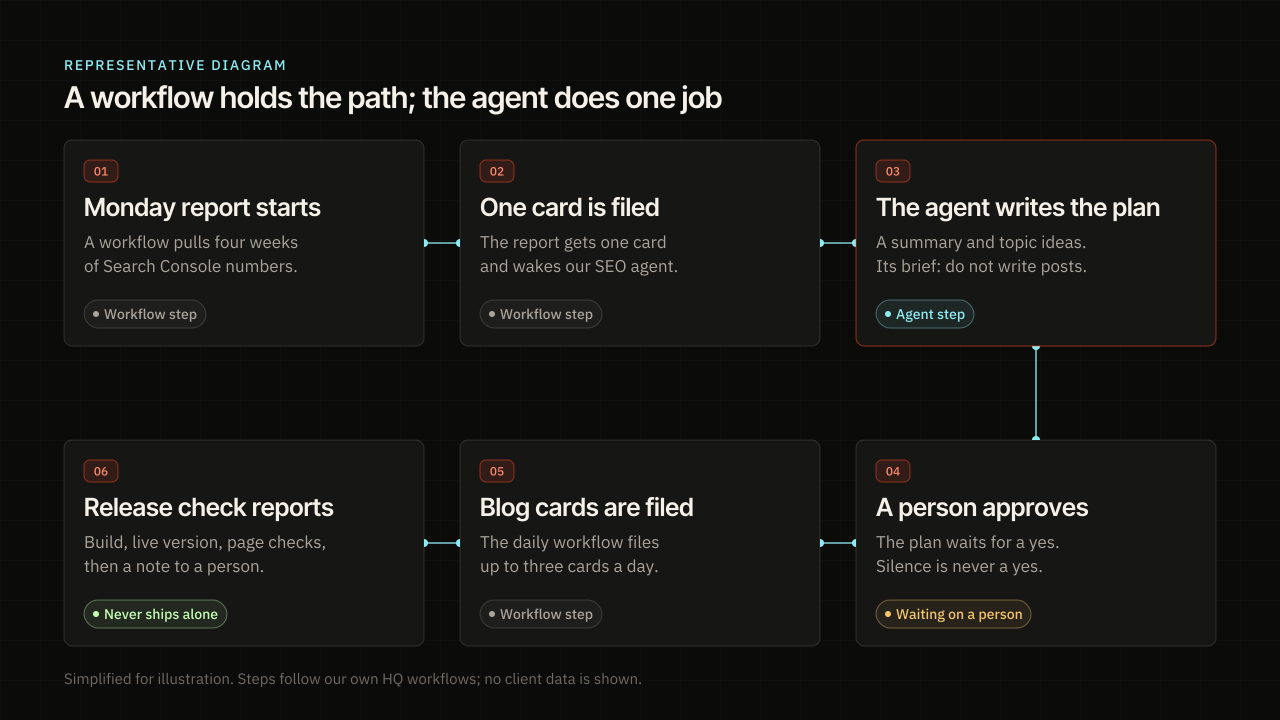
Take our weekly SEO report. Every Monday morning a workflow pulls the last four weeks of Search Console numbers, files one card, and wakes our SEO agent. The agent has one job, which is to write the summary and twenty-one topic ideas, each with a search query and a page name. Its brief says not to write the posts. When it is done, the workflow asks for an owner’s approval of that plan.
A person approves anything that leaves the building
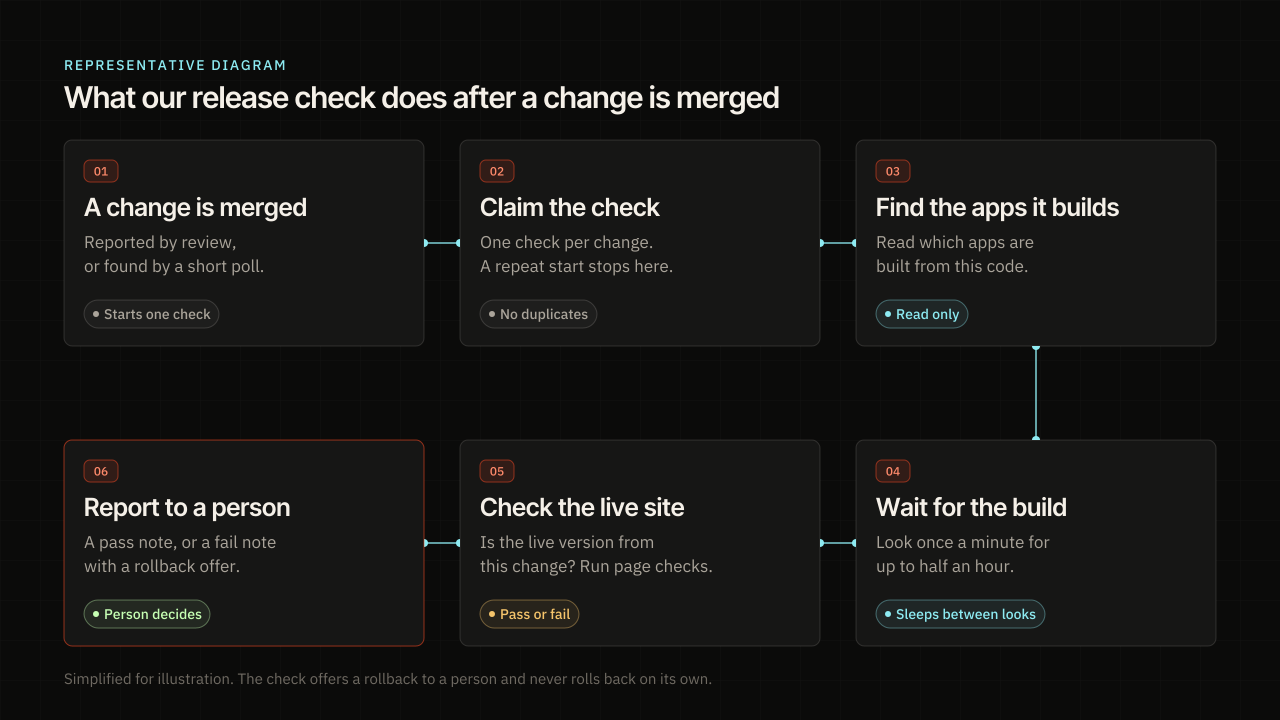
The plan waits until a person on our team says yes, and silence is never a yes. Only after that does the daily blog workflow file up to three blog cards. When a post ships, another workflow checks the build once a minute for up to half an hour. It checks that the live site came from that exact change, then runs quick checks on the pages. It never ships or rolls back on its own. If a check fails, it offers a rollback to a person and waits. Our note on how client work moves through HQ walks through that review side.
Off means off
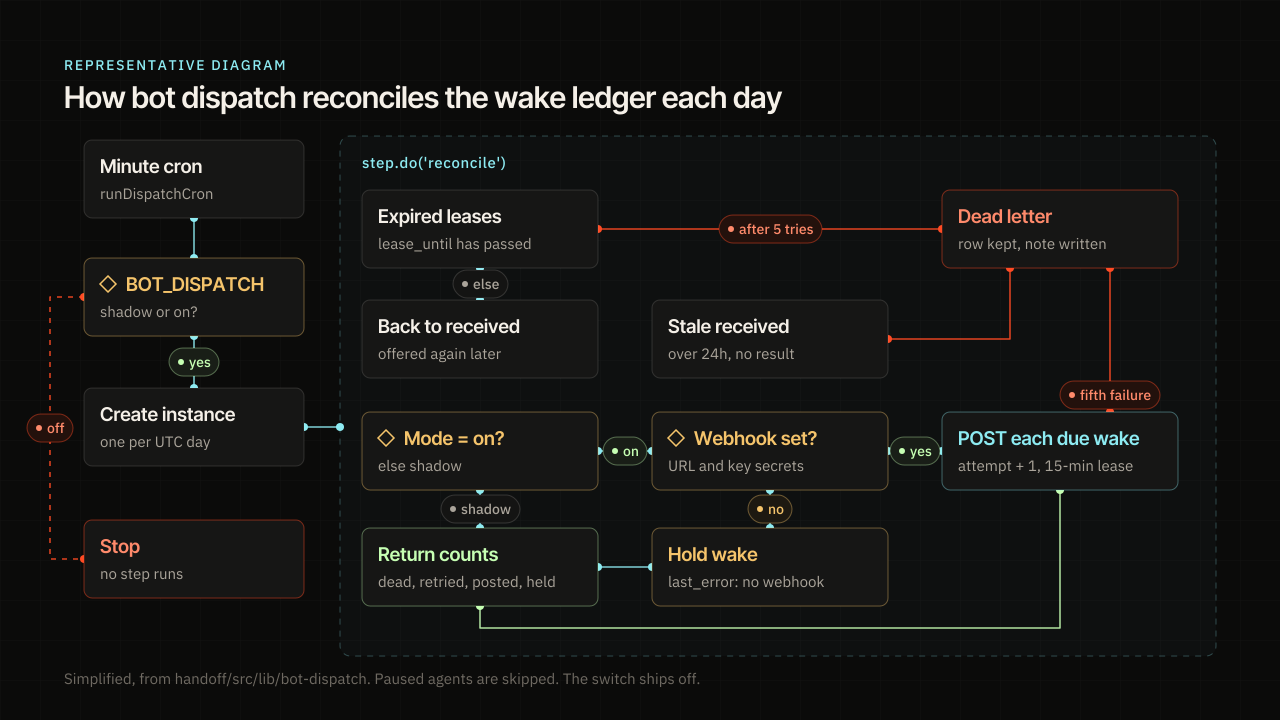
Every workflow has an on and off switch, and it checks that switch again right before its first step. So a stray start does nothing at all while the switch is off. That is a boring rule, and boring is the point. It means a bad day for one model never turns into a bad day for a client.
Our bot dispatch workflow shows all four rules in one place. Once a day it looks over every wake we sent to a bot. A wake that sat too long goes back in line, and a wake that keeps failing is set aside with a note, never deleted. It only posts a wake when its switch is on and its web address and key are both set. Today that switch is off, so it only keeps count.

How do I choose between an AI workflow and an AI agent?
Start with a workflow, and add an agent only at the step that needs judgment. Work through these checks from the top down:
- If you can write the steps on one page, build a workflow. You get the same result each time and a cost you can plan.
- If one step needs reading, writing, or sorting messy text, put a model inside that one step. Keep what goes into the step and what comes out of it fixed.
- If you truly cannot say what the steps are, like open research or a large code change, use an agent for that part. Give it a short list of tools and a place to stop.
- If the result goes to a customer, moves money, or changes your live site, add a step where a person approves it. Do this whether you picked a workflow or an agent.
- If you are not sure yet, run the job by hand once and write down each step as you go. That page is your first workflow.
An agent is the wrong pick when the job has rules you already follow, when a mistake costs real money, or when you need to explain each result later. A workflow is the wrong pick when the steps change every single time.
What goes wrong when a business starts with an agent?
The most common miss is giving an agent the whole job because the demo looked smart. A demo runs once, while a business runs the same job hundreds of times. Here is what we see go wrong when the agent comes first:
- No fixed steps: the agent finds a new path on each run, so nobody can say why two results differ.
- No stop: the agent keeps calling tools, and the bill grows with each turn it takes.
- No owner: nobody checks the output, so a wrong answer reaches a customer.
- No off switch: when it goes wrong, there is no clean way to pause it.
Each fix is the same. Write the steps down, give the model one job, and add a person where it matters. Our note on why AI pilots stall covers what happens when a project never gets that far.
Should your business run on workflows or agents?
Most of it should run on workflows, with agents doing the parts that need judgment. That is how we build AI assistants and agents for clients, and it is how we run HQ for ourselves. The workflow gives you a result you can trust and explain. The agent gives you speed on the hard step. You get both without betting the whole job on how a model feels that day.
The first step is knowing which of your jobs are ready. The Readiness Check takes five to seven minutes. It looks at the work that slows you down, your data and workflow, where new customers come from, and how well answer engines can read your public site. It gives you next steps for your business. Take it, then start a project, and we will look at the results with you.
Questions
What is the difference between an AI workflow and an AI agent?
A workflow follows a path of steps you wrote in code, and the AI does one job inside a step. An agent is an AI that picks its own next step as it works. Both can use the same model. The difference is who holds the plan.
Is an AI agent better than an AI workflow?
Not for most business work. A workflow gives the same result each time and a cost you can plan. An agent is better only when nobody can write the steps down ahead of time, such as open research or a large code change.
Can you use an AI agent inside a workflow?
Yes, and that is how we build. The workflow holds the order of steps, the checks and the approvals. The agent does one clear job inside one step, like writing a first draft, and hands it back for the next step.
What does deterministic mean for AI in a business?
It means the same input takes the same steps and lands in the same place every time. A workflow is deterministic because the path is written in code. The model inside a step can still vary, so a person checks anything that leaves the business.
How do I know which of my jobs are ready for AI?
Take the Readiness Check. It takes five to seven minutes and looks at the work that slows you down, your data and workflow, where new customers come from, and a live read of your public site. It gives you next steps for your business.
Sources
- Building effective agents. Anthropic. 2024-12-19.
- τ-bench: A Benchmark for Tool-Agent-User Interaction in Real-World Domains. arXiv (Yao, Shinn, Razavi and Narasimhan). 2024-06-17.
- Gartner Predicts Over 40% of Agentic AI Projects Will Be Canceled by End of 2027. Gartner. 2025-06-25.
- Cloudflare Workflows: Overview. Cloudflare Docs. 2026-09-18.
Related





All notes
- AI Agents for Business: When to Use One
- AI Agents vs Agentic AI: A Plain Split
- AI Automation Agency vs Consultant: Who to Hire
- AI Automation for Small Business: Which Job First
- AI Consultant for Small Business: What to Ask
- AI for Small Business: What the Surveys Still Say
- An AI Implementation Framework in Five Stages
- AI Readiness Assessment Questionnaire: The Themes
- AI Readiness Assessment: What It Measures and How to Score
- AI Readiness Checklist Before You Buy a Tool
- An AI Readiness Framework an Owner Can Score
- AI-Ready Data: What a Small Business Needs First
- AI Strategy for Small Business: Start With the Job
- AI Visibility for an Established Company: How to Check Yours
- Answer Engine Optimization: What Google Still Requires
- Business Process Automation With AI: Write the Job
- Generative Engine Optimization vs SEO
- How Can AI Help a Small Business? What Surveys Count
- How Client Work Moves Through HQ and Our AI Agents
- How to Show Up in ChatGPT and AI Overviews
- How to Use AI in Your Business: Twelve Jobs
- Is My Business Ready for AI? Signs to Read First
- Off-the-Shelf AI or Custom Software
- What Is an AI Agent? A Plain Answer for Owners
- What Is llms.txt, and Who Actually Reads It
- Why AI Pilots Stall After the Demo
- Why We Build on Cloudflare: Security, AI and the Edge